
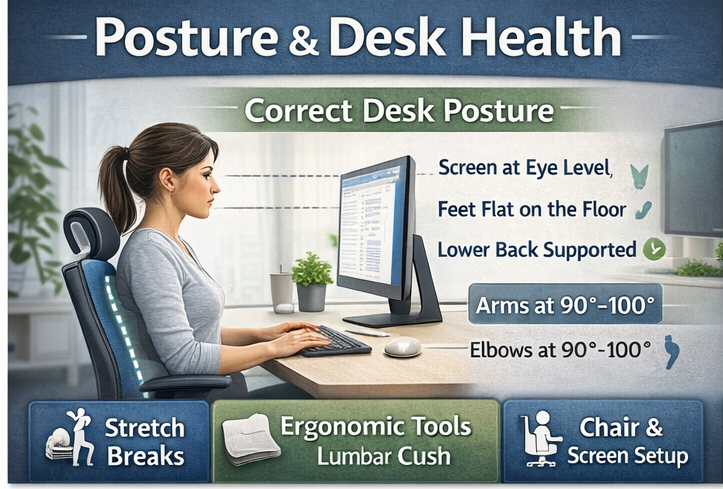
Poor posture and desk setup are some of the biggest contributors to everyday aches and pains — especially in the neck, shoulders, back, and hips. With more people working at desks, laptops, and screens than ever before, posture and desk health have become essential to long-term comfort and wellbeing.
At BodyReliefHub, we focus on simple, practical ways to improve posture and reduce strain while working, studying, or gaming — without expensive equipment or complicated routines.
Why Posture & Desk Health Matter
Your body isn’t designed to sit still for hours at a time. When posture is poor or your desk setup is incorrect, it can place continuous strain on muscles and joints.
Over time, this can contribute to:
- Neck and shoulder tension
- Upper and lower back pain
- Headaches
- Hip and lower limb stiffness
- Wrist and forearm discomfort
- Fatigue and reduced focus
The good news? Small changes can make a big difference.
Common Desk & Posture Problems
Many posture issues develop without us noticing. Common causes include:
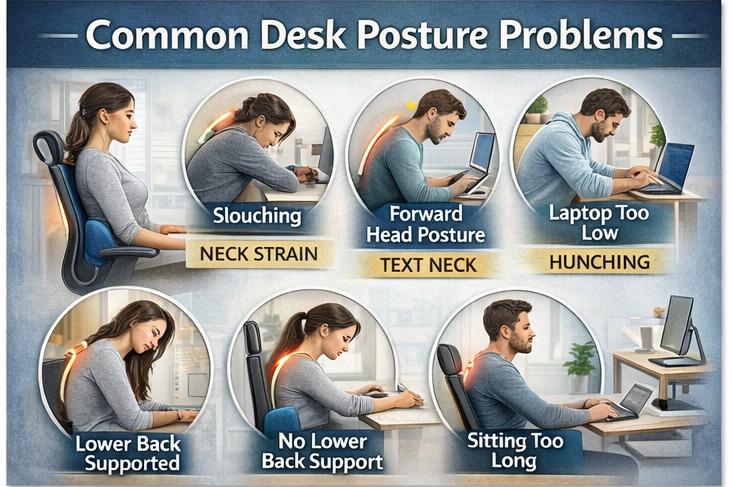
- Slouching or rounded shoulders
- Forward head posture (leaning toward the screen)
- Laptop screens positioned too low
- Unsupported lower back
- Feet not flat on the floor
- Sitting for long periods without movement
- Poor chair or desk height
These habits can quietly build tension throughout the day.
Signs Your Desk Setup Needs Improvement
You may need to review your posture or desk health if you experience:
- Stiffness after sitting
- Neck or shoulder tightness by the end of the day
- Lower back discomfort
- Wrist or forearm soreness
- Frequent headaches
- Fatigue or restlessness when working
These are often signals that your body is under unnecessary strain.
Simple Posture & Desk Health Tips
1. Improve Your Sitting Posture
Aim for a neutral, relaxed position:
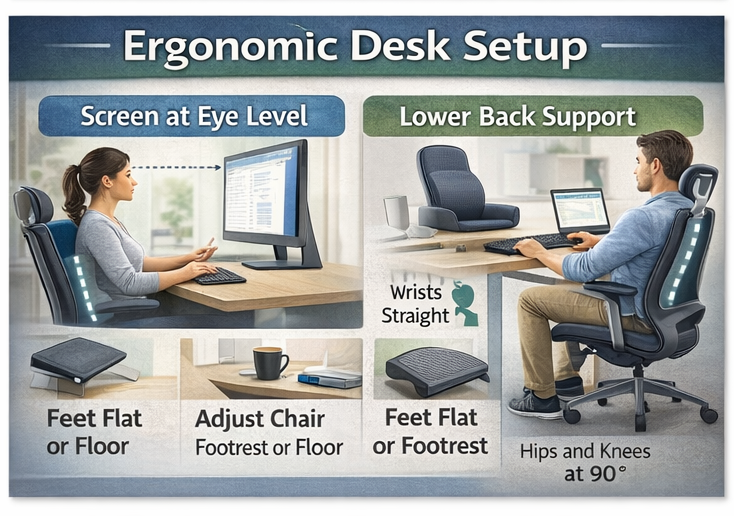
- Sit back in your chair with your lower back supported
- Keep shoulders relaxed (not raised)
- Head stacked over your shoulders
- Elbows close to your body
- Feet flat on the floor or footrest
Avoid locking yourself into one rigid position — comfort matters.
2. Adjust Screen Height
Your screen should be:
- At or slightly below eye level
- About arm’s length away
- Directly in front of you
Laptop users may benefit from a stand and external keyboard to avoid hunching forward.

3. Support Your Lower Back
Lower back support helps maintain natural spinal curves.
Options include:
- Built-in chair support
- Lumbar cushions
- Rolled towel behind the lower back
Proper support can significantly reduce fatigue and back tension.
4. Move Little and Often
Movement is just as important as posture.
Try to:
- Stand up every 30–60 minutes
- Do gentle stretches
- Roll shoulders and neck
- Walk briefly during breaks
Even small movements help reset muscle tension.
5. Stretch Tight Areas
Desk work often tightens specific muscles.
Focus on stretching:
- Chest and shoulders
- Neck and upper back
- Hip flexors
- Hamstrings
Gentle, regular stretching supports better posture over time.
Helpful Desk Health Tools
Some tools can support better posture and comfort:
- Lumbar cushions
- Footrests
- Monitor risers or laptop stands
- Ergonomic keyboards or mouse options
- Posture reminder devices
You don’t need everything — choose what suits your setup and habits.
When to Seek Professional Advice
If posture-related discomfort:
- Is persistent or worsening
- Includes numbness or tingling
- Affects daily activities or sleep
- Does not improve with basic changes
It’s best to seek advice from a qualified healthcare professional.
Explore More Posture & Desk Health Resources
On BodyReliefHub, you’ll find:
- Desk stretch routines
- Posture improvement guides
- Ergonomic product reviews
- Neck, shoulder, and back relief hubs
- Recovery and relaxation tools
Our aim is to help you work more comfortably — without pain becoming part of your routine.
Build Better Habits Today
Good posture isn’t about perfection — it’s about awareness, movement, and consistency. Small daily changes can lead to long-term relief.
👉 Explore our Posture & Desk Health guides and start supporting your body today.